Problem
A tiny keyboard screen comes with a surprisingly full-sized set of questions. What should it display? Who controls it? What happens when an alert interrupts? And after sending a new picture, did the screen actually change? Preparing, previewing, transferring, and displaying content each needed a check.
AL80 Studio brings controls into a browser interface. A local host supports continuously updated screen content. The browser can prepare and preview content offline; sending it requires a device connection.
Decisions
I decided how the controls should be arranged and how the screen should behave, directed AI-assisted implementation, and tested the result on hardware. One important choice was giving one host process ownership of the display. Panels supply content, the host rotates them, and alerts can interrupt before handing control back.
That made switching, interruptions, and reconnecting part of the test plan. Control placement mattered too: a setting should make sense where someone finds it, with a clear connection to the thing it changes.
Illustrative reconstruction · Device behavior
Validation
Device-free protocol checks and a mock transport helped test screen packets before hardware sessions. Then came a very specific disagreement: every image-data block was acknowledged, and the keyboard kept showing the old picture. A physical key combination changed the view but still showed the old image. The transfer logs were answering a different question from the screen.
The fix gave the setup sequence time to settle and removed a trailing view switch that skipped past the new card. I confirmed the corrected sequence on the keyboard. That hardware feedback turned a vague display problem into a change we could test.
Evidence
- Components
- Browser control panel and local host
- Status
- Public browser app and local host
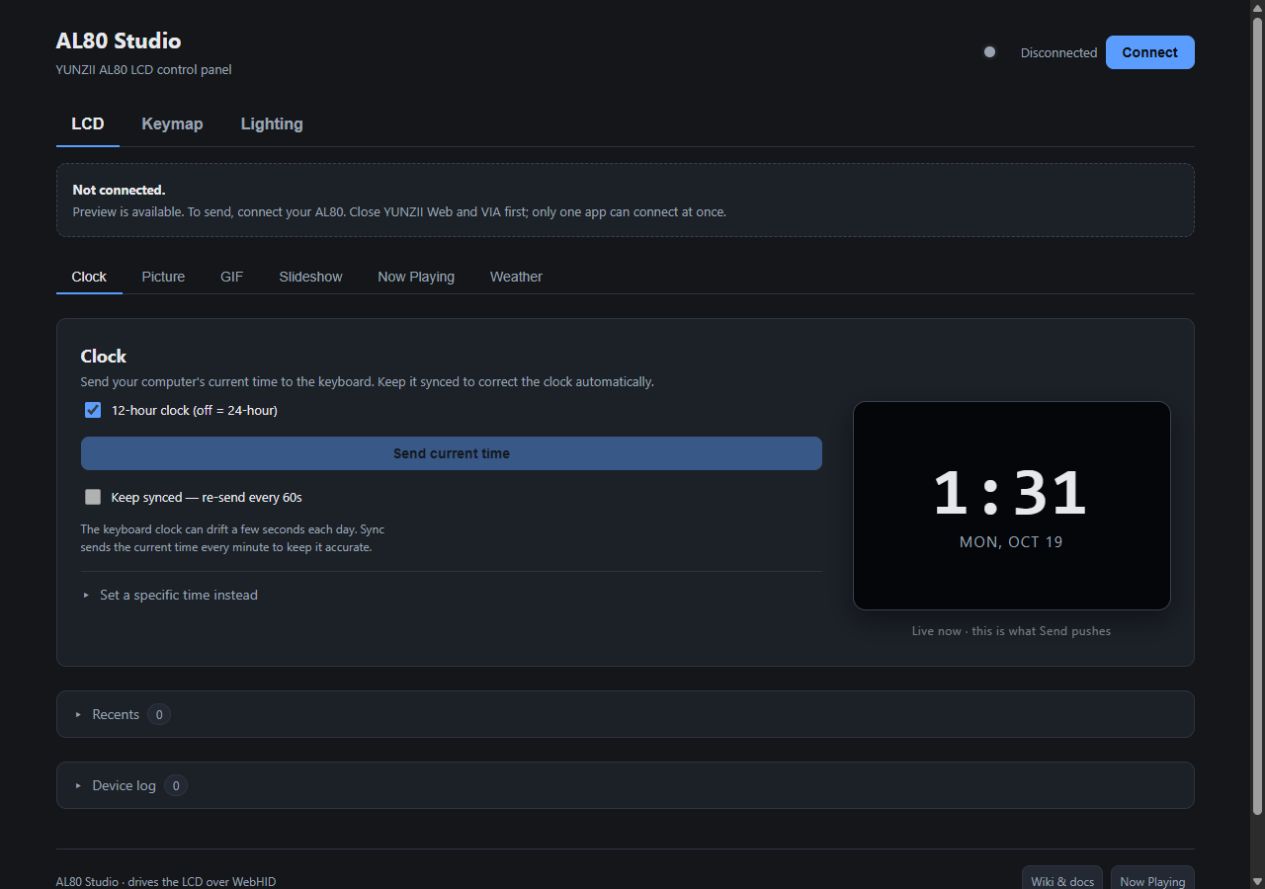
The public project includes a browser control panel, a local host, source code, and documentation. Its records describe historical on-device checks for screen, lighting, and keymap behavior as well as device-free tests. The display debugging record documents the old-picture failure and confirmation of the corrected sequence.
Validation record · Reviewed October 19, 2026
| Surface | Evidence and boundary |
|---|---|
| Browser preview | The dated capture above shows disconnected preparation. It does not establish a successful transfer. |
| Mock transport | The device-free test checks packet counts, frame-size rejection, RGB and clock commands. No physical display is involved. |
| Physical display | The historical debug log records all 549 blocks acknowledged while the old image remained, then an on-device confirmation after correcting the setup timing and removing the trailing view toggle. |
| Interruption and reconnect | Part of the test plan, not a fresh hardware pass. The debug record does not pin a browser version, firmware build or session date; I have not filled those gaps in. |
Limits
Browser device control uses a wired connection and a WebHID-capable browser. Bluetooth worked in historical testing; an earlier 2.4 GHz success claim was retracted and remains unresolved. The documented hardware checks are historical, not a fresh certification of the current runtime or universal compatibility.
I owned the interaction choices, implementation direction, troubleshooting, and hands-on testing. Implementation was AI-assisted. The lesson was wonderfully literal: check the screen, even when the logs are pleased with themselves.